Sales call recording and analysis means capturing every sales conversation, transcribing it, and scoring what was said so you can coach reps without listening to each call yourself. For a small owner-led team, the right tool depends less on feature count and more on whether the output turns into one clear coaching action per rep, per week.
This review covers eight recording and conversation-intelligence products, with approximate 2026 pricing and an honest read on who each suits. It also explains what to do with the recordings, because capture alone rarely changes how a rep sells.
What sales call recording and analysis actually covers
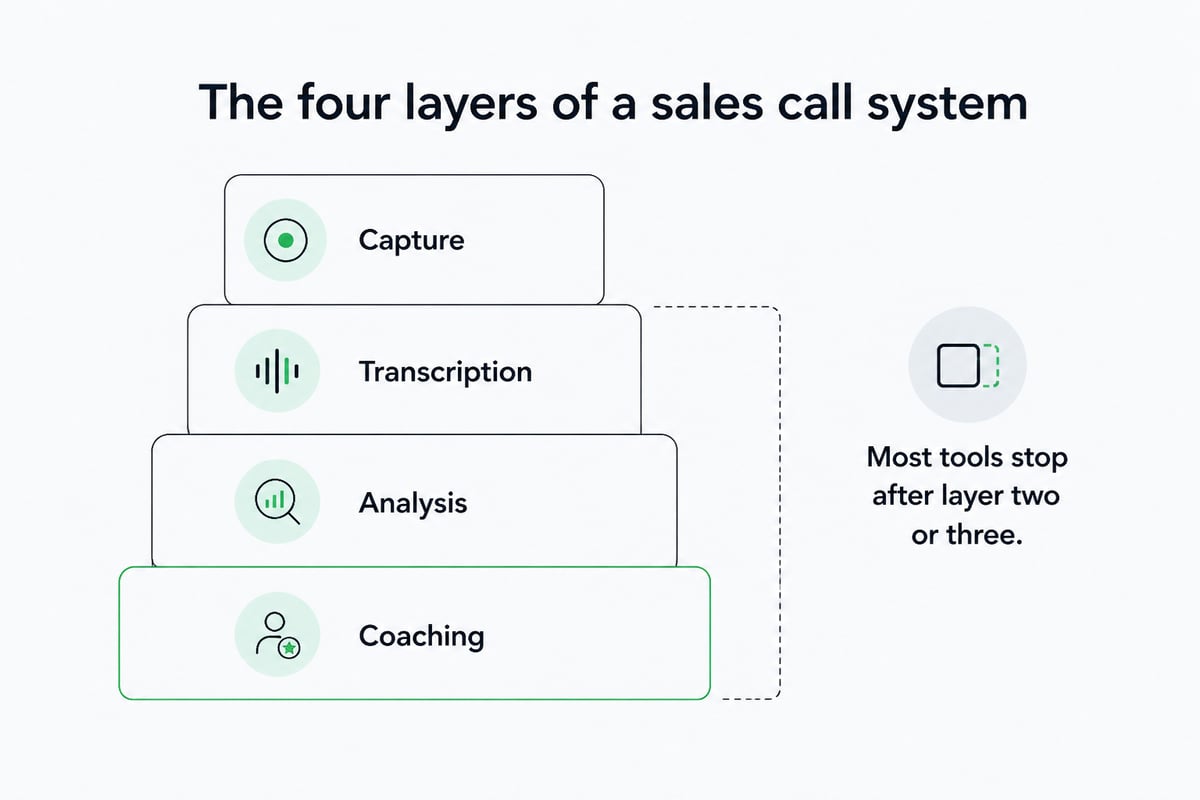
A complete system has four layers: capture, transcription, analysis, and coaching. Most products handle the first two well. The third varies widely, and the fourth is where small teams most often stall.
- Capture: records video or audio from Zoom, Teams, Meet, or a phone system.
- Transcription: converts speech to searchable text, usually with speaker labels.
- Analysis: flags talk ratio, questions asked, objections, competitor mentions, and next steps.
- Coaching: turns findings into specific feedback and practice for a rep.
Published 2026 comparisons show starting prices spanning a wide range, from roughly $10 per user per month for note-taking tools to higher figures for phone- and CRM-native tools, with several enterprise platforms requiring quotes. That spread reflects how different the categories are. A transcription tool and a coaching system solve different problems, even when both record calls.
For a deeper look at how analysis software differs from simple recorders, Bizware AI's guide to sales call analysis software is a useful companion.
Why owner-led teams need recorded calls
An owner who sells and manages at the same time cannot sit in on every call, and a rep's own recollection of a call is an unreliable record. Recordings replace memory and guesswork with evidence you can review in minutes.
The practical benefits for a team of three to fifteen reps are specific:
- Consistency: every rep is measured against the same standard, not against the owner's mood that week.
- Faster onboarding: new hires can hear how your best rep handles pricing pushback.
- Visible patterns: if four of five lost deals stall at the same question, you see it quickly.
- Fair feedback: coaching rests on what was said, which reduces defensiveness.
The harder problem is volume. If each rep takes 20 calls a week, reviewing even a fraction by hand is unrealistic. That is why scoring against a written playbook matters. A sales playbook gives analysis something to measure against, so the tool flags deviations instead of generating generic metrics.
How to evaluate a sales call recording and analysis tool
Judge a tool by five criteria that match how a small team works, not by the length of its feature list.
- Coverage: does it capture the calls you actually run? Many tools handle video meetings but miss phone calls or in-person conversations.
- Scoring against your standard: can you define what a good call looks like, or are you limited to generic metrics?
- Coaching output: does it tell a rep what to fix, or only show a dashboard for managers?
- CRM fit: does it write back to the system your team already uses?
- Cost at your headcount: per-seat pricing with add-ons can double the real price.
Recording laws also deserve attention. Consent requirements differ by state and country, and some teams need two-party consent notices. Claap's guide to sales call recording discusses recording coverage, entry pricing, and legal considerations, and your own counsel should confirm what applies to you.
The eight tools reviewed
Each entry below uses the specs and prices listed as of November 2026. Prices are approximate and change by plan and billing term.
1. Cirrus Insight
Cirrus Insight is built around Salesforce and suits revenue teams that want recording to update the CRM. Pricing depends on capability. Meeting Capture records video and audio and produces a transcript and summary, and Live Coaching sits at the upper tier, which is a real cost for a small team.
Best for: Salesforce-centered teams. Skip if: you do not use Salesforce.
2. HubSpot Sales Hub
HubSpot Sales Hub Professional is listed at $90 per seat per month with annual billing and includes 750 transcription hours per month. Recording and transcription are native to the CRM, which removes a separate vendor. The cost is the full Professional seat, so it makes sense mainly when the team already lives in HubSpot.
Best for: HubSpot CRM users. Skip if: you only want call analysis without a CRM change.
3. Salesloft Conversation Intelligence
Salesloft Conversation Intelligence integrates with Salesloft workflows and offers real-time battlecards triggered by keywords. It fits forecast-driven revenue teams already running Salesloft for sequencing. No price is listed here, and teams outside that ecosystem will find less value.
Best for: existing Salesloft users. Skip if: you are not on the platform.
4. Zoom Revenue Accelerator
Zoom Revenue Accelerator Essentials is listed at $66 per user per month with annual billing. Sales Assist provides real-time guidance across Zoom, Teams, and Meet, alongside call recording and analysis. It is a natural choice if most of your selling already happens on Zoom.
Best for: teams that sell mainly on Zoom. Skip if: a large share of your conversations are phone or in person.
5. Avoma
Avoma Startup is listed at $19 per recorder seat per month annually, and the Conversation Intelligence add-on is listed at $29 per seat per month annually. Together that adds up to recording plus scoring at a combined seat price. It offers live battlecards and AI call scoring, which suits SMB and mid-market sales and customer-success teams.
Best for: small teams wanting scoring at a moderate price. Skip if: you need an add-on-free price.
6. Fireflies.ai
Fireflies.ai lists annual prices of $10 per seat per month for Pro and $19 for Business, with Enterprise also available and a free plan. Recording and transcription come on every plan, and conversation intelligence starts at Business. Integrations and AI templates round it out. It is the lowest-cost route to searchable transcripts across a cross-functional team.
Best for: budget-conscious teams. Skip if: you need structured sales scoring on a low tier.
7. Kickscale
Kickscale is listed at EUR 49 per user per month and offers live translation in more than 50 languages. It adds AI coaching and takes a GDPR-first position. It is a strong match for multilingual European sales teams and a narrow one for anyone else.
Best for: multilingual European teams. Skip if: you sell in a single language.
8. Outreach Kaia
Outreach Kaia is priced by custom quote, with no US-dollar price shown. Amplify Plus lists 50,000 AI credits, and the product provides real-time transcription, AI summaries, action-item detection, and integrations with Zoom, Teams, Meet, and Webex. It fits SDR-heavy outbound teams already on Outreach.
Best for: outbound-heavy teams using Outreach. Skip if: you are not an Outreach customer.
9. Bizware AI Sales Coach
Bizware AI Sales Coach is Bizware AI's own product, so weigh this entry with that in mind. It captures sales calls, scores them against the team's own sales playbook, and gives each rep private coaching plus voice or text role-play practice before the next call, with a manager dashboard. Pricing starts at $77 per user per month billed annually (Starter). Its capture covers virtual and in-person conversations in one place, and each coaching step targets one behavior gap with a measurable next call.
The tradeoff is scope. It is built for small owner-led B2B teams that need consistent coaching, not for large revenue organizations that need forecasting and deal analytics across hundreds of reps. Teams that only want meeting notes will pay for more than they use. You can learn more on the Bizware AI site.
Best for: owners and managers who cannot hear every call and want coaching to follow automatically.

Side-by-side pricing snapshot
| Tool | Approximate price (as of November 2026) | Main strength |
|---|---|---|
| Cirrus Insight | Varies by capability | Salesforce capture |
| HubSpot Sales Hub | $90 per seat/month (Professional, annual) | Native CRM recording |
| Zoom Revenue Accelerator | Essentials listed at $66 per user/month (annual) | Zoom-based guidance |
| Avoma | $19 recorder seat + $29 CI add-on | Scoring for SMB |
| Fireflies.ai | Pro and Business listed per seat/month | Low-cost transcripts |
| Kickscale | Listed at EUR 49 per user/month | Live translation |
| Bizware AI Sales Coach | From $77 per user/month (annual) | Playbook scoring and coaching |
Salesloft Conversation Intelligence and Outreach Kaia are omitted from the table because no comparable price is listed. For a wider view of the market, the Attention roundup of recording tools covers phone-system options too.
What to do with recordings: a coaching workflow
Recordings only pay off when each one leads to a single, specific action for a rep. A simple weekly loop works for teams that cannot review everything.
- Score every call against the playbook. Use criteria you wrote, such as discovery depth, objection handling, and a clear next step.
- Find one behavior gap per rep. Resist listing five fixes. One gap, such as skipping budget questions, is enough.
- Pull two or three real moments. Use clips from that rep's own calls as the teaching material.
- Practice before the next call. Role-play the exact moment, by voice or text, until it feels natural. Bizware AI's piece on sales role-play exercises lays out formats you can use.
- Measure the next call. Check whether the behavior changed, then move to the next gap.
This one-gap-at-a-time rhythm is the reason a manager call coaching workflow holds up better than occasional ride-alongs. It also keeps feedback private and specific, which reps tend to accept more readily than public critique.
Who each approach fits
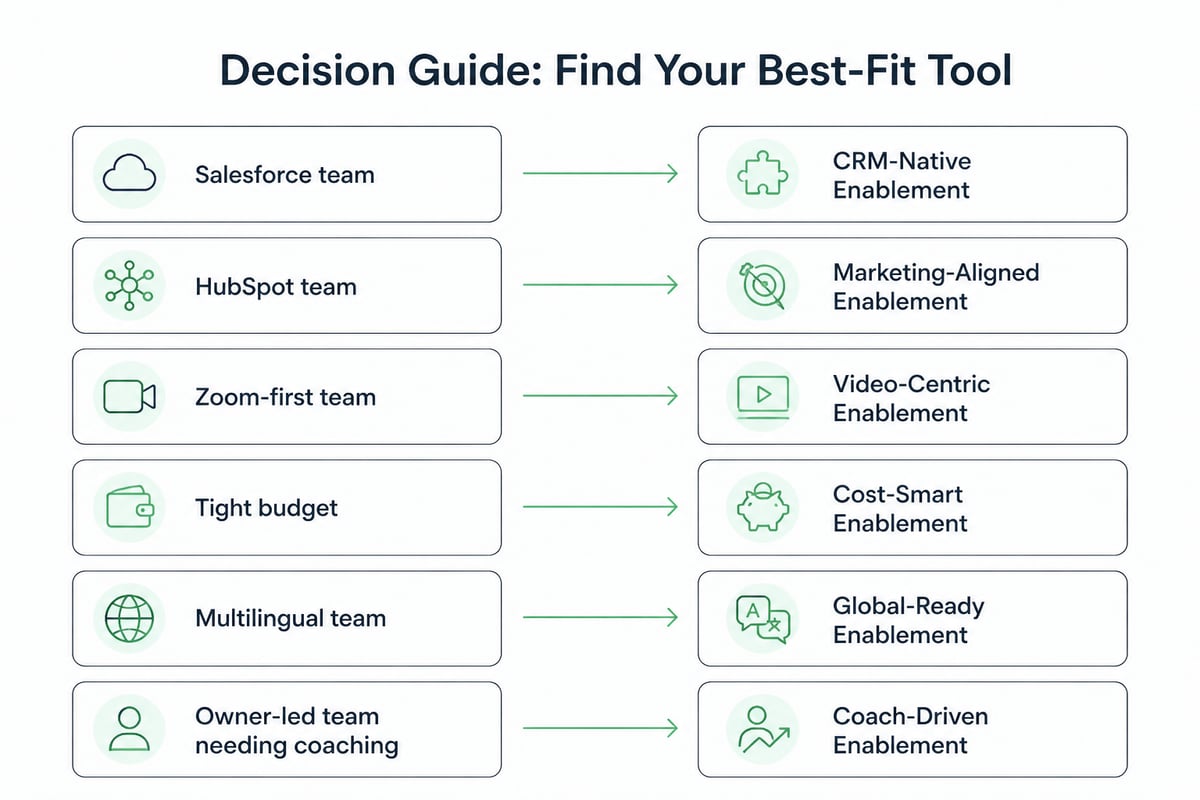
Match the tool to your situation instead of buying the longest feature list.
- Already deep in a CRM: HubSpot Sales Hub or Cirrus Insight keeps recording inside the system you use.
- Selling mainly on Zoom: Zoom Revenue Accelerator reduces setup.
- Tight budget, transcripts only: Fireflies.ai gives searchable records at a low price.
- Scoring on a modest budget: Avoma pairs recording with call scoring.
- Multilingual European selling: Kickscale addresses language and compliance.
- Owner-led team needing coaching, not just data: Bizware AI Sales Coach is aimed at this case.
Consultants advising several small B2B teams face a slightly different need: a repeatable method they can bring to each client. A tool that scores against a client's own playbook and produces rep-level coaching fits that model better than a generic transcript archive. Bizware AI's overview of sales coaching for small businesses describes the approach in more detail.
Common mistakes to avoid
Teams usually stumble in predictable ways, and most are avoidable with a little planning.
- Recording without a standard. Without a playbook, scores are noise.
- Reviewing too many calls. Pick a small sample per rep, or let scoring surface the outliers.
- Coaching too many things. Several fixes at once means none stick.
- Skipping consent. Confirm recording notices and local law before you start.
- Measuring tool usage instead of behavior change. Logins say little. A changed behavior on the next call says a lot.
Sales call recording and analysis works best as a small, steady habit: capture, score, coach one gap, and check the next call.
Start by writing down the three behaviors that separate your best calls from your average ones, then check one recorded call per rep against that list this week. If you want that scoring and coaching to run without you listening to every call, try Bizware AI Sales Coach, which captures calls, scores them against your playbook, and coaches each rep on one gap at a time. Ryan Cook can show you how that works on your own sales conversations when you schedule a free demo.